Behind the shop
Database
The design this shop runs on. The diagrams are those of the project report; the row counts are read from PostgreSQL now.
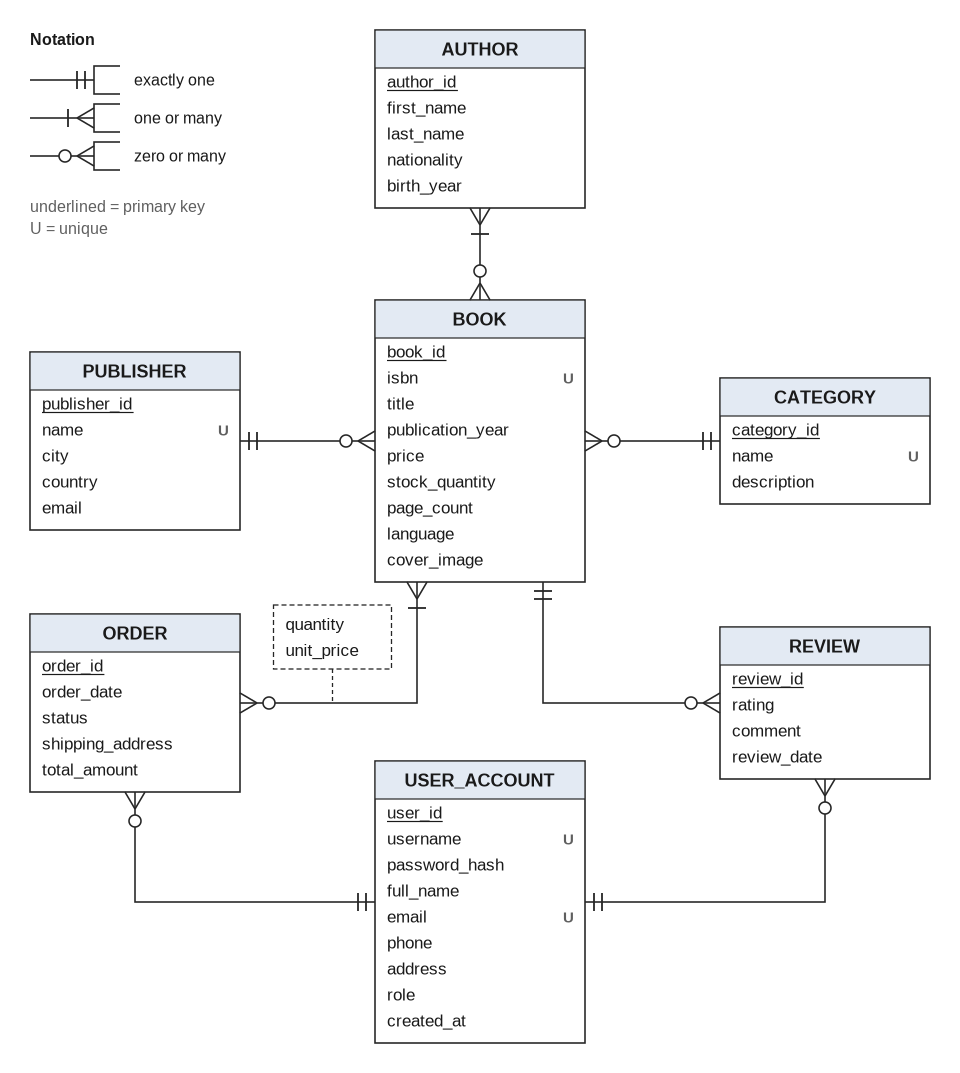
Seven entities: user account, author, publisher, category, book, order and review.
Two relationships are many-to-many (a book can have several authors, an order can contain several books),
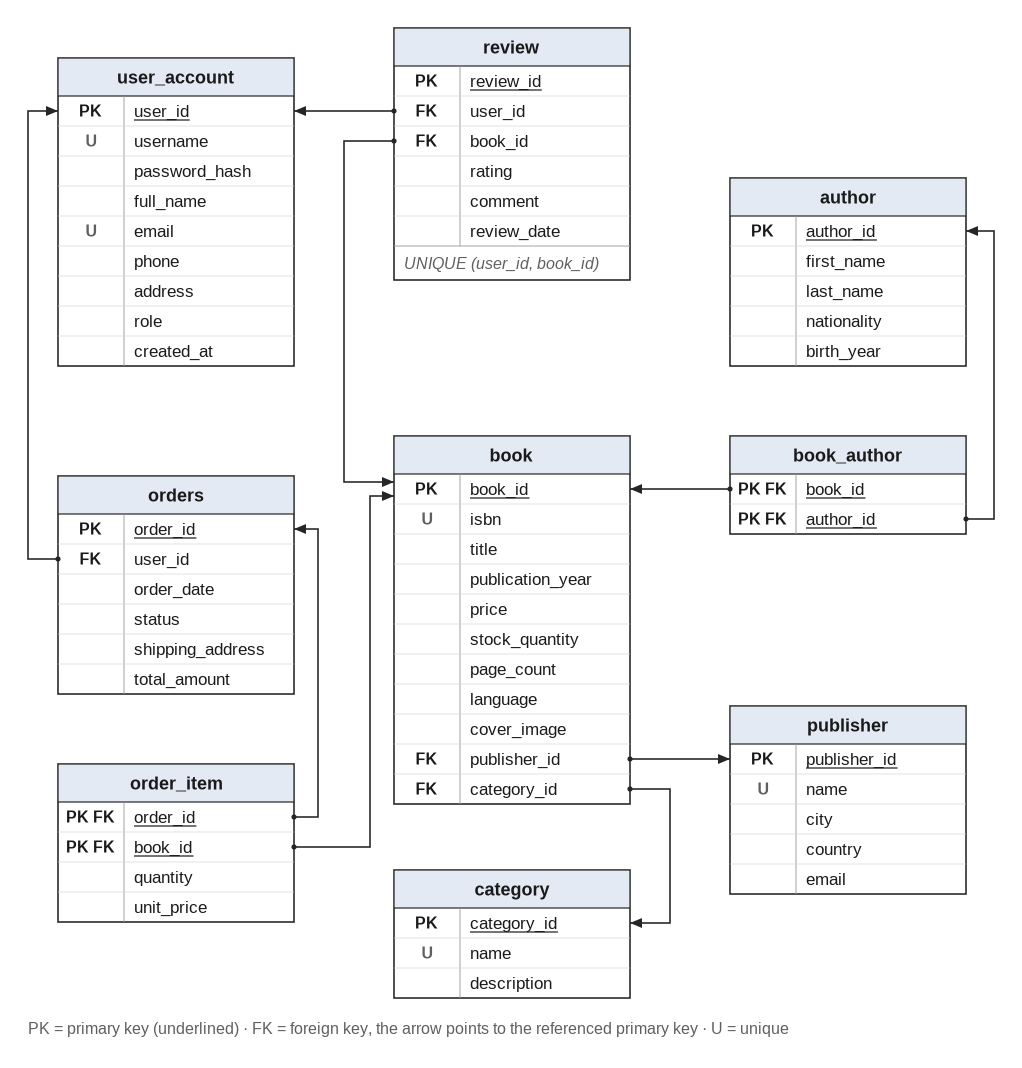
so each of them becomes a table of its own, book_author and order_item. That gives nine tables.
1. ER diagram
Open the diagram aloneThe entities with their attributes, and the seven relationships between them: an author writes a book, a publisher publishes it, a category classifies it; a user places an order, an order contains books; a user writes a review, and a review is about a book.
2. Relational schema
Open the diagram aloneThe nine tables with their primary keys (PK) and foreign keys (FK), as created by db/01_schema.sql.
3. From the diagram to the tables
six decisions, one per step; lines from db/01_schema.sqlCREATE TABLE book ( book_id INTEGER GENERATED BY DEFAULT AS IDENTITY PRIMARY KEY, isbn VARCHAR(13) NOT NULL UNIQUE, title VARCHAR(200) NOT NULL, publication_year INTEGER, price NUMERIC(8, 2) NOT NULL CHECK (price > 0), ... );
Step 1 of 6
An entity becomes a table
Every entity of the ER diagram is one table and every attribute one column. book_id is the primary key: PostgreSQL gives each new book the next number, and that number identifies the row.
CREATE TABLE book (
    ...
    publisher_id     INTEGER NOT NULL REFERENCES publisher (publisher_id) ON DELETE RESTRICT,
    category_id      INTEGER NOT NULL REFERENCES category (category_id)  ON DELETE RESTRICT
);
Step 2 of 6
One-to-many becomes a foreign key
A book has exactly one publisher and one category, so the book row stores their ids. NOT NULL makes them mandatory. ON DELETE RESTRICT refuses to delete a publisher or a category that still has books.
CREATE TABLE book_author (
    book_id   INTEGER NOT NULL REFERENCES book (book_id)     ON DELETE CASCADE,
    author_id INTEGER NOT NULL REFERENCES author (author_id) ON DELETE CASCADE,
    PRIMARY KEY (book_id, author_id)
);
Step 3 of 6
Many-to-many becomes its own table
A book can have several authors and an author several books. Neither table can hold that in one column, so book_author keeps one row per pair. The two ids together are the primary key, so the same pair cannot be stored twice.
CREATE TABLE orders (
    order_id     INTEGER GENERATED BY DEFAULT AS IDENTITY PRIMARY KEY,
    user_id      INTEGER NOT NULL REFERENCES user_account (user_id)
                 ON DELETE RESTRICT,
    ...
    total_amount NUMERIC(10, 2) NOT NULL CHECK (total_amount >= 0)
);

CREATE TABLE order_item (
    order_id   INTEGER NOT NULL REFERENCES orders (order_id) ON DELETE CASCADE,
    book_id    INTEGER NOT NULL REFERENCES book (book_id)    ON DELETE RESTRICT,
    quantity   INTEGER       NOT NULL CHECK (quantity > 0),
    unit_price NUMERIC(8, 2) NOT NULL CHECK (unit_price > 0),
    PRIMARY KEY (order_id, book_id)
);
Step 4 of 6
An order and its lines
order_item links an order to its books and adds quantity and unit_price. The price is stored on the line, so an old order keeps its price when the book price changes. Deleting an order deletes its lines (CASCADE); a book that was sold cannot be deleted (RESTRICT).
-- user_account
role    VARCHAR(10) NOT NULL DEFAULT 'customer'
        CHECK (role IN ('admin', 'customer')),
email   VARCHAR(100) NOT NULL UNIQUE,

-- book
stock_quantity INTEGER NOT NULL DEFAULT 0 CHECK (stock_quantity >= 0),

-- orders
status  VARCHAR(10) NOT NULL DEFAULT 'pending'
        CHECK (status IN ('pending', 'shipped', 'delivered', 'cancelled')),

-- review
rating  INTEGER NOT NULL CHECK (rating BETWEEN 1 AND 5),
UNIQUE (user_id, book_id)        -- one review per user per book
Step 5 of 6
Rules the database enforces itself
CHECK and UNIQUE are tested by PostgreSQL on every INSERT and UPDATE, whatever the application does: stock never goes below zero, a rating is 1 to 5, a role or status is one of the listed words, and a user has one review per book.
Step 6 of 6
How a page uses all this
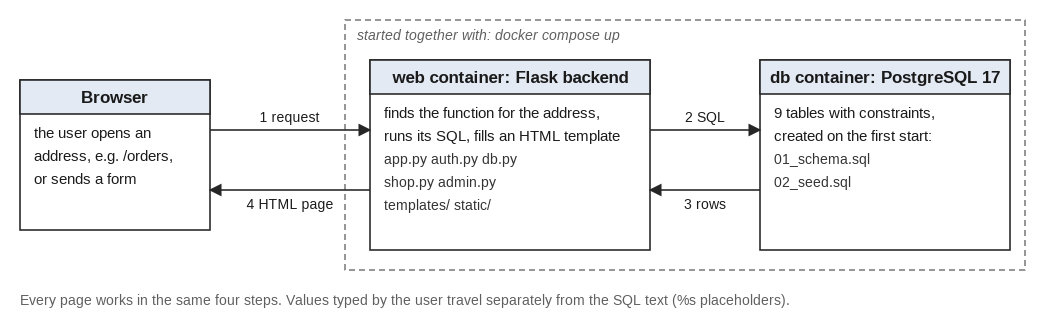
The browser asks for an address, Flask finds the function for it, the function sends SQL to PostgreSQL, the rows come back and fill an HTML template. The statements of every page are listed at its bottom, under "SQL behind this page".
4. Tables and rows
counted now with SELECT COUNT(*)5. How a page is built
Open the diagram aloneEvery page works in the same four steps: request, SQL, rows, HTML page. The SQL of the page you are looking at is listed at the bottom of every page, under "SQL behind this page".
This site is a student project made for the CMPE341 Database Design & Management course (Group 2). It is not a real shop.
SQL behind this page 10 statements
This page was built with 10 statements
-
SELECT COUNT(*) AS row_count FROM user_account
Back to this SQL statementShow on the pageBuilds: the number of rows of user_account in the table list.
Picture
The page as it is now. Red: what this statement builds.
Step by step
SELECT COUNT(*) AS row_count FROM user_account
Step 1 of 2
SELECT
Chooses the columns (or computed values) that the result shows. Here COUNT counts rows.
BackSELECT COUNT(*) AS row_count FROM user_account
Step 2 of 2
FROM
The table the rows come from.
-
SELECT COUNT(*) AS row_count FROM publisher
Back to this SQL statementShow on the pageBuilds: the number of rows of publisher in the table list.
Picture
The page as it is now. Red: what this statement builds.
Step by step
SELECT COUNT(*) AS row_count FROM publisher
Step 1 of 2
SELECT
Chooses the columns (or computed values) that the result shows. Here COUNT counts rows.
BackSELECT COUNT(*) AS row_count FROM publisher
Step 2 of 2
FROM
The table the rows come from.
-
SELECT COUNT(*) AS row_count FROM category
Back to this SQL statementShow on the pageBuilds: the number of rows of category in the table list.
Picture
The page as it is now. Red: what this statement builds.
Step by step
SELECT COUNT(*) AS row_count FROM category
Step 1 of 2
SELECT
Chooses the columns (or computed values) that the result shows. Here COUNT counts rows.
BackSELECT COUNT(*) AS row_count FROM category
Step 2 of 2
FROM
The table the rows come from.
-
SELECT COUNT(*) AS row_count FROM book
Back to this SQL statementShow on the pageBuilds: the number of rows of book in the table list.
Picture
The page as it is now. Red: what this statement builds.
Step by step
SELECT COUNT(*) AS row_count FROM book
Step 1 of 2
SELECT
Chooses the columns (or computed values) that the result shows. Here COUNT counts rows.
BackSELECT COUNT(*) AS row_count FROM book
Step 2 of 2
FROM
The table the rows come from.
-
SELECT COUNT(*) AS row_count FROM orders
Back to this SQL statementShow on the pageBuilds: the number of rows of orders in the table list.
Picture
The page as it is now. Red: what this statement builds.
Step by step
SELECT COUNT(*) AS row_count FROM orders
Step 1 of 2
SELECT
Chooses the columns (or computed values) that the result shows. Here COUNT counts rows.
BackSELECT COUNT(*) AS row_count FROM orders
Step 2 of 2
FROM
The table the rows come from.
-
SELECT COUNT(*) AS row_count FROM order_item
Back to this SQL statementShow on the pageBuilds: the number of rows of order_item in the table list.
Picture
The page as it is now. Red: what this statement builds.
Step by step
SELECT COUNT(*) AS row_count FROM order_item
Step 1 of 2
SELECT
Chooses the columns (or computed values) that the result shows. Here COUNT counts rows.
BackSELECT COUNT(*) AS row_count FROM order_item
Step 2 of 2
FROM
The table the rows come from.
-
SELECT COUNT(*) AS row_count FROM review
Back to this SQL statementShow on the pageBuilds: the number of rows of review in the table list.
Picture
The page as it is now. Red: what this statement builds.
Step by step
SELECT COUNT(*) AS row_count FROM review
Step 1 of 2
SELECT
Chooses the columns (or computed values) that the result shows. Here COUNT counts rows.
BackSELECT COUNT(*) AS row_count FROM review
Step 2 of 2
FROM
The table the rows come from.